TvQuran
Showing posts with label Google App Engine. Show all posts

Monday, January 9, 2012

Google App Engine : Using the Data store


Lesson 4 : Using the Data store
In our previous lessons we learned:

Today we will learn how to store data on the AppEngine Server to list it at any time. 
Lessons Outlines:-
  1. Introduction
  2. Types of Data Store
  3. Component of Data Store
  4. Complete our previous application
  5. Test your application.
1 – Introduction
 In General ,  
  • Storing data in a scalable web application can be tricky.
  • A user could be interacting with any of dozens of web servers at a given time
  • and the user’s next request could go to a different web server than the one that handled the previous request

With Google App Engine , 
  • You don’t have to worry about any of that App Engine’s infrastructure takes care of all of the distribution , replication and load balancing of data behind a simple API
  • You get a powerful query engine and transactions as well.
2 - Types of Data Store
1-      High Replication datastore ( HRD )

a.       The default datastore for an application

b.      Data is replicated across multiple data centers using a system based on the Paxos algorithm.

c.       This provides the highest level of availability for reads and writes, at the cost of higher latency on writes due to the propagation of data.

2-      Master/Slave Data Store

a.        Designates one data center to hold the master copy of all data.

b.      Data written to the master data center is replicated asynchronously to all other (slave) data centers.

c.       Since only one data center is the master for writing at any given time, this option offers strong consistency for all reads and queries, at the cost of periods of temporary unavailability during data center issues or planned downtime.

3 - Component of Data Store

1-      The datastore writes data in objects known as entities.

2-      Each entity has a key that identifies the entity.

3-      Entities can belong to the same entity group, which allows you to perform a single transaction with multiple entities.

4-      Entity groups have a parent key that identifies the entire entity group.

4 - Complete our previous application

now will update our previous application posted in my post First Application to include data store.
follow next steps :


1 - Update Servlet Class to Save our Entity 


2 - Update JSP Page to list all Stored Object


5 - Test your application


As we mentioned before.to run your applications write (http://localhost:8888/) in your browser to be able to test it.

And now we need to know where the entities are stored?
The answer is: check this URL (http://localhost:8888/_ah/admin) you will find your entities and data stored in it.

Now we have finished our lesson today.

  To download the source code


Thanks


read more...

Saturday, December 24, 2011

Google App Engine : Your First Application

Lesson #3 Outlines
  1. Choosing Framework ( if you want )
  2. Authenticating Users
  3. Develop First Application 
1 - Choosing Framework ( if you want )

  • Choosing the best application framework almost always generates a heated debate.
  • There are pros and cons for each framework, and every developer has an opinion.
  • To ensure that your application will run within the App Engine server runtime environment, App Engine imposes some constraints that enable applications to run “nicely” together and be scalable across multiple distributed runtime instances.
  • While Google doesn't officially support the libraries or frameworks that run on App Engine, it does take a community-oriented approach to compatibility.
  • Popular Java libraries and frameworks are listed in the next Table 


2 - Authenticating Users 

  •     Nearly every web application nowadays requires user authentication.

  •     You’ll build out your authentication framework to let users enter and view timecard entries—naturally, only for themselves.

  •     Authentication with App Engine comes in two flavors. You can choose to plug into Google’s Accounts service (Users service), or you can roll your own with custom classes, tables, and memcache.
    User Services :


3 - Develop First Application

    1 – Create New web Application Project


    2 – Application Directories


    3 – Using User Authentication (Servlet Class)


    4 – View (Using JSP)


    5 - Update web.xml to ( include servlet class , jsp file , and chnage your welcome file )


    6 - Run Application As a web application (http://localhost:8888 )


    7 - Deploy the Application To upload your application click on this icon


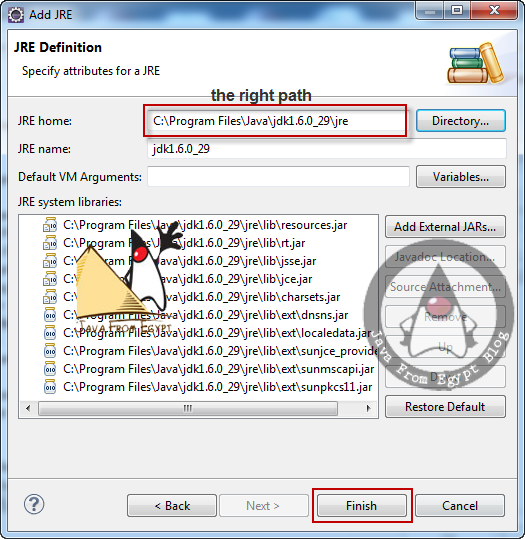
   .... ( note ) .... : if you face any problem after creating your jsp file follow the next steps :

from window menu ---> choose preferences ---> select java ----> select installed JRE


we have Finished our lesson today ........ in the next lesson we will know how to store the greeting to be able to display all of them


To Be Continue
Thanks

    To download the source code
read more...

Friday, December 16, 2011

Getting Started with Google App Engine

Lesson #2 outline
  1.      Where Do We Start ?
  2.            Installing the Google Plug-in for Eclipse
  3.             Signing Up for Google App Engine
1.      Where Do We Start ?


2.     Installing the Google Plug-in for Eclipse
       To install the plug-in using Eclipse

a.      Select the Help menu and then select the Install New Software option.

b.       In the “Work with” text box, enter

}  For eclipse 3.7 (Indigo)
http://dl.google.com/eclipse/plugin/3.7
}  For eclipse 3.6 (Helios)
http://dl.google.com/eclipse/plugin/3.6
}  For eclipse 3.5 (Galileo)
http://dl.google.com/eclipse/plugin/3.5
                              } For eclipse 3.4 (Ganymede) 
                                    http://dl.google.com/eclipse/plugin/3.4

c.      Expand the “Plug-in” and “SDKs” elements in the navigation tree.

d.      Select “Google Plug-in for Eclipse 3.6” and “Google App Engine SDK”. Make sure you select the “Google Web Toolkit SDK” option as well. Click Next.

e.   Restart Eclipse when prompted. Make sure you are using the Java perspective.

Enter you plug-in URL

3.      Signing Up for Google App Engine
1 - Log-in to your Google Account

2 - You will be re-directed to create your account/application


3 - Verify your account using SMS


4 -at the End your can create your application


we have Finished our lesson today

    in the next lesson we will discuss how to develop your first Google App Engine application and how to upload it our Google App Engine account which created today.


To Be Continue 

Thanks 
read more...

Thursday, December 15, 2011

Introduction to Google App Engine ( GAE )

Lesson #1 Outlines
  1.       Introduction
  2.       Introduction to Cloud Computing
  3.       Difference Between Cloud Computing Types
  4.       Introduction to Google App engine 
Let us discuss it.

1.     Introduction

  •           Application development, as you know it, is about to change.
  •   Think about your development project plans for a moment. Do they all seem to have the same line items for the first phase? Build a server. Install a database. Configure the application server.
  •      You should be able to focus your energy on building the application from day one. That’s where Google App Engine comes into the picture.
  •      App engine is a part of Cloud computing.

2.     Introduction to Cloud Computing

  •  Any cloud-computing offering should have certain characteristics Above all, it should be multi tenant. 
  •  A key component of a true cloud-computing platform, multitenancy is a type of software architecture where one instance of the offering is used to serve multiple tenants.
  • There are three main, accepted levels of cloud-computing offerings. They are Infrastructure as a Service (IaaS), Platform as a Service (PaaS), and Software as a Service (SaaS).


3.     Difference Between Cloud Computing Types

        i -  Infrastructure as a Service  ( IaaS )


a.      lowest level

b.      Offers the physical infrastructure (or Virtualized physical infrastructure) to tenants with the ability to pay for what they need in terms of computing power.

c.       Instead of purchasing servers, software, and physical location, a tenant of an IaaS offering can pay for these components as needed in a more subscription-based fashion.

d.      Amazon.com offer “pay per CPU hour” pricing for Linux and Windows platforms.

                  ii -  Software as a Service ( SaaS ) 

a.      much like IaaS

b.      Offers solutions to the customer on a per-usage model.

c.       SaaS offerings completely abstract the physical and application layers from the end user or developer.

d.      For example, Salesforce.com provides its own customizable user interface and proprietary programming language (Apex) but doesn’t expose to the end user the hardware or software layers that power the application.

e.       An important characteristic when it comes to application upgrades and maintenance: everything is centrally updated (available to all customers).

                        iii- Platform as a Service ( PaaS )
a.      Between IaaS and SaaS

b.      PaaS offers a bit more than IaaS, without providing an actual end-user product.

c.       PaaS components are typically building blocks or solution stacks that you can use to build your own applications.

d.      App Engine is a PaaS offering, currently supporting a Java and a Python runtime to build your scalable web applications without the need for complex underlying hardware and software layers.

e.       You are restricted by a governor process or application quotas.

f.       Application quotas, which Google defines for App Engine applications, define the daily-allotted amount of computing power, space, or bandwidth that any one application is allowed to utilize.

4 - Introduction To Google App Engine 

1 - Google App engine Architecture


2 - Why App Engine 

  • Managing everything is very hard ( without GAE)
  • Hosting (without GAE ) means hidden costs
v   Idle capacity
v   Software patches & upgrades
v   License fees
v   Lots of maintenance
v   Traffic & utilization forecasting
v   Upgrades
  •  GAE Language runtimes ( Python & Java )


3 - Components of an App Engine application

a.       SDK & “The Cloud”
b.      Hardware
c.       Networking
d.      Operating system
e.       Application runtime
f.       Java, Python
g.      Static file serving
h.      Services
i.        Fault tolerance
j.        Load balancing


4 - App Engine Services


To Be Continued ..............................
Thanks 


read more...